
MAV-blog

Stuff related to MAV's (and UAV's) from a hobbyist's point of view. Info

Micropilot MP2028 Review - Part 1

I’m lucky enough to have the opportunity to “play” a bit with the Micropilot autopilot module and software that comes with it. While going through all the steps before we have our MAV in the air, I’ll do my best to post some of my experiences on my weblog. Part one! A first glimpse at the autopilot.

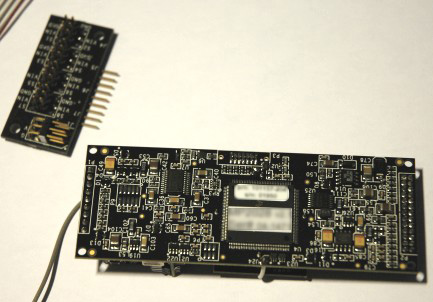
The module itself looks very professional: All paths are in an inner layer, so none is visible. On top of that, a special coating layer is covering the PCB.

Some chips on the module caught my attention:

  • Sipex UART to RS232 on-board : Isn’t it odd that they use RS232 on the module and not just TTL to communicate with the modem (which also contains a RS232 to TTL chip) and PC?
  • MAX660 Switched Capacitor Voltage Converter I have no idea what they use that for
  • Cirrus Logic AD convertor This is just a normal AD-convertor
  • LCX14 Standard hex invertor
  • A 49.1uH inductor . I suppose that is for filtering? I’m not familiar with other uses of an inductor…
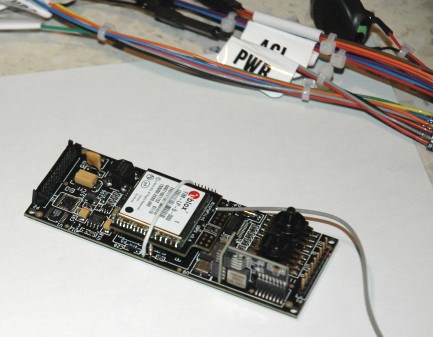
  • 3 gyroscopes and 2 accelerometers. The Analog Devices ones you find in most IMU’s.
  • One static and one dynamic pressure sensor. Also looks very standard.
  • XC9536XL High Performance CPLD This is a Xilinx FPGA. High performance, low power.
  • M410000025: This is RAM. I have on idea how much…
  • The main processor is a FreeScale one. I didn’t rip off the sticker on it to see which one :-)
  • Commonly used TIM GPS module from u-blox.
  • The servo board contains the 17HCT237 to demultiplex a 3-bit data input to 8 data output (to the servos)

Most of these components are pretty standard, but it is clear that this module has quiet some processing power!

The weight of the module is only 28 grams. Unfortunately, the standard GPS antenna that comes with it is 38 grams! The interconnecting cables that come with it aren’t made for weight-saving either. So if we want a really low weight, we’ll have to come up with some ideas ourselves. The manual refers us to the website for solutions for these kind of issues, but I haven’t gotten my Support ID yet to log in.

Speaking of the manual: it looks very complete (160+ pages) and there is even an instruction video explaining the basic setup procedures. Compared to some other autopilot modules i’ve seen, it all looks very complete and professional.
Every parameter of the numerous PID loops it contains is configurable, including min and max settings, which PID loop to use at what speed and some others I never even thought of myself (and still need to find the use of it ;-) ). For automatic take-off, there are also a lot of options.

The back of the module, with the servo board next to it:
The front of the module, with a small part of the cables mess to interconnect everything:
More to come! If you’d like me to cover a certain topic of the micropilot, let me know!

17 August 2007, 05:40 | Link |
  1. don’t understand a bit, but looks all very exciting :-)


    Geert, 27 August 2007, 08:39 | #


  2. What is the cheapest Micro GPS autopilot and camera system that you can suggest? Thanks!


    Caven, 21 September 2007, 13:31 | #


  3. Hi Caven,

    Camera systems:
    http://www.aeropix.ch
    http://www.rangevideo.com
    http://www.rc-tech.ch

    Personally I use the rc-tech TX-40 and I love it! Very small and light.

    As for hobby-autopilot you might look into PicoPilot (http://www.u-nav.com/picopilot.html) or RC-CAP (http://www.uavs.net/rcap.html). However, some better cheap one are on the way.

    Tom


    Tom, 22 September 2007, 15:33 | #


  4. micropilot is not a good autopilot system bcause they doesnt support joystick control .

    if u have any idea pls email me


    negapayusk, 3 April 2008, 06:57 | #


  5. Can anybody help me telling how much time will a person with rc experience, will spend installing the mp 2028 in a standard configuration fixed wing airplane, and how much time can spend testing and adjustind loops. Thanks


    Nestor, 29 May 2008, 19:50 | #


  6. Mp2028 is easy,


    alfriend, 13 July 2008, 05:28 | #


  7. @ Nestor

    Installation is easy, testing and adjusting loops depends on your level of experience.

    If you have any further questions please feel free to contact us at info@micropilot.com


    Robert, 11 October 2008, 06:23 | #


  8. Hi, I am using the 2028 for my project too. Can I check with you in your 2nd picture, the bunch of wires will be connected to the RF receiver, isn’t it? Can you provide me with a step by step installation guide? I tried to email the manufacturer, but it seems to take long time to responde.

    Thanks a lot.


    Billy, 24 October 2008, 12:42 | #


  9. hi,Tom,I use 2028 too. But I meet a prolbem. The software show a error on my computer screen. Can you give me some suggest?
    When I transmit a VRS file to autopilot, then the autopilot show me“UAV#1: MPERR#44:fly file change VRS”, and ask me retry or cancel? I never met before, so, please, If you know what that mean and how to resolve it. Thanks! — John


    John, 28 October 2008, 09:56 | #


  10. @Billy
    The installation guide comes with the Micropilot :-) The micropilot support is not hyper-resonsive but they’re not that slow either

    @John
    This is due to vrs flashing the Micropilot & upload the waypoint (.fly file). The fly file can eg. overrule some of your configurations. It is explained in the Horizon manual how to do it in the correct order.

    Otherwise contact Micropilot support :-)


    Tom, 28 October 2008, 11:43 | #


  11. Thanks Tom.


    John, 29 October 2008, 07:31 | #


  12. Hello.
    I have just bought an autopilot 2128.
    I would like to begin a contact to exchange experiences on this team.
    these they are my mail vxenriquez@hotmail.com


    Victor Enriquez, 25 March 2009, 02:33 | #


  13. Hi

    And that costs $5500 ?

    LOL, you can get better
    hardware for $300, and
    probably better firmware
    to !

    Daaa…what a wast of money :(


    MickCopter, 4 December 2009, 03:53 | #


  14. Hi Tom

    I have a 2028 with a 1 hertz GPS module. I understand from another user that it can be upgraded to the Ublox 4hertz module by sending it back to MP. So now the obvious question can you tell me the Ublox model you have on your AP and the software version?


    Rory, 12 December 2009, 05:15 | #


Name
E-Mail
http://
Message
  Textile Help

|